


Beauty Camera - Sweet Camera
4.6145.00 Reviews
App Specs
- Version
- 3.7.8
- Updated On
- License
- Free
- Downloads
- 10,000,000+
- Developer
- iMediaStar
- Categories
- Beauty
- Platform
- Android, iOS
Screenshots
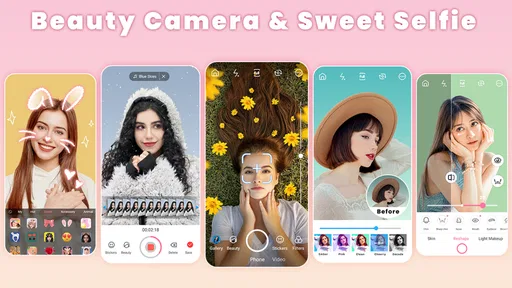
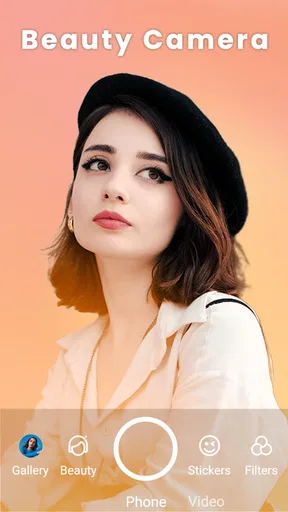
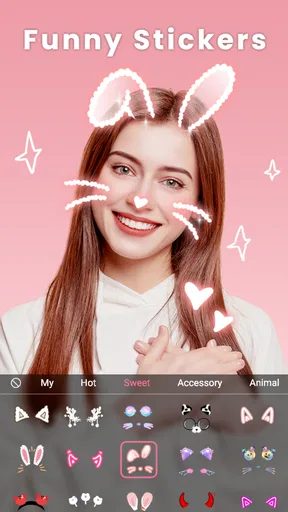
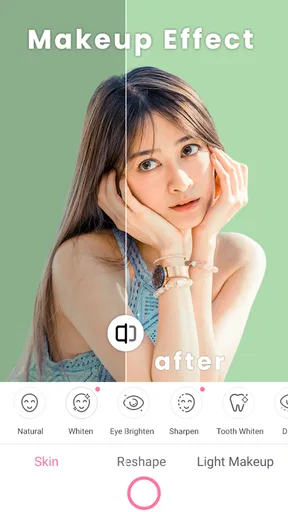

 Analysis by AppCompare
When I’m deciding whether a selfie app is worth keeping, I care less about a long list of effects than whether I can make a photo feel like me without turning a quick snapshot into a chore. Beauty Camera - Sweet Camera is aimed at exactly that kind of casual portrait editing: it brings beauty effects, makeup-style touches and stickers together in a camera app. I see its appeal in the ability to try a look while taking a selfie, then make a few adjustments rather than opening a separate editing program.
What the free entry point means
The app is free to download, which makes it easy to try before deciding whether it suits your routine. It also offers optional in-app purchases, with items priced from $1.99 to $19.99. I’d treat that range as a reason to check the purchase details in the app before paying, not as a promise that a particular effect or editing tool requires payment. If you only want to experiment with the free experience, you can start there and decide for yourself whether anything else is worth buying.
That distinction matters for a beauty camera because the value is personal. Someone who takes selfies now and then may be perfectly happy with a small set of favorite looks, while a person who likes to change styles often may put more value on having extra choices. I wouldn’t spend simply because a paid item is available. First, I’d try the kind of photo I actually take, save or share a result, and see whether I want more control often enough to justify a purchase.
Where the app earns its place
For me, the main convenience is having camera effects and selfie-focused adjustments in one place. That can be more useful than a general photo editor when I’m getting ready to take a portrait and want to judge a look as I go. Beauty Camera is made by iMediaStar, and its focus is clear: it is a beauty app rather than a broad photography suite. The 4.9 average rating, based on around 22,000 ratings, suggests that many users have found a reason to like it, though a rating cannot tell me whether its particular style will match yours.
The app has passed 5 million installs, but popularity alone is not a substitute for checking how it feels on your own phone. It is rated for Everyone and requires Android 6.0 or later. Its current version is 3.6.1. Those details make it easier to judge basic compatibility, while the actual appeal still comes down to whether you enjoy the results and find the controls comfortable.
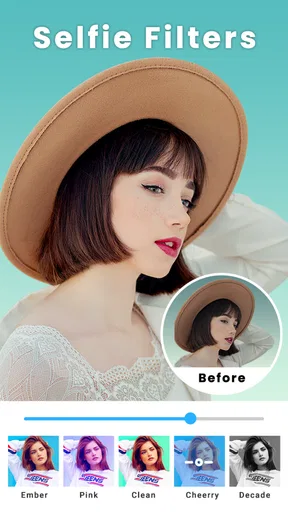
A practical way to get more natural-looking edits is to begin with the least dramatic effect and increase it only when the photo needs more. If I’m taking a picture in soft daylight, strong smoothing or makeup can look out of place beside the real texture and lighting. I’d also compare the preview with the unedited shot before saving: seeing the two side by side helps me catch when a filter has changed the mood more than I intended. That small pause is useful in any selfie editor, but especially when the point is to keep a familiar face looking like itself.
How it fits into an everyday photo routine
Imagine getting ready to meet a friend, taking a quick selfie by a window, and wanting to send a cheerful version in the group chat. I’d use the live look to find a subtle effect, try a sticker only if it suits the moment, and avoid layering every available treatment onto the same image. The advantage is speed: I can make a portrait feel more finished without turning the task into a full editing session. If I want a carefully retouched image for a portfolio or a precise color correction, I’d switch to a dedicated editor instead.
Worth Reading Before You Choose

Switching to Android Auto Means Rethinking Your Driving Routine

Google Calendar Makes a Crowded Week Easier to Manage

Baby Panda World Brings Quick Play to Modern Phones, but Its Game Library Feels Busy

ESPN’s Live Game View Makes Following Close Games Easier

QuizzLand Review: A Good Fit for Short Trivia Breaks, Not Every Player

Basketball Stars: Multiplayer Is Fast, but Can It Recover When Matches Go Wrong?
That is also how I’d compare it with the usual alternatives. A phone’s built-in camera is the simpler choice when I want a straightforward, unaltered photo and dependable integration with the rest of the device. A general-purpose editor is better when I need detailed control over a whole scene, not just a selfie. Beauty Camera sits between those options: its focus on face-oriented looks and playful additions makes it more approachable for quick portraits, but that focus is not a replacement for advanced editing tools.
There are trade-offs to that convenience. A strong beauty effect can make different photos look alike, and a sticker that feels fun in a preview may not suit a more natural or professional image. I would keep separate intentions in mind: a playful selfie for friends can handle a bolder treatment, while a profile photo usually benefits from restraint. It also helps to take a clean original first, so I have an unaltered version to return to if I later decide the edited result feels too polished.
Small choices that improve the result
Lighting makes a bigger difference than piling on effects. Before adjusting anything, I’d turn toward a window or move away from a harsh overhead light; a filter cannot reliably rescue a face split by strong shadows. I’d also settle on the framing before experimenting with makeup or stickers. Cropping after adding decorative details can cut them off or make the composition feel crowded, so I prefer to compose first and embellish second.
Another useful habit is to try one kind of change at a time. If I adjust a beauty effect, add makeup, and place a sticker all at once, it becomes harder to tell which choice improved the picture and which one made it feel artificial. Testing each change separately gives me a clearer sense of the app’s style and makes it easier to repeat a look I like. For everyday use, that is more reliable than chasing a dramatic transformation in a single pass.
I would skip this app if I rarely take selfies, prefer photos with no beauty treatment, or need detailed retouching with fine control over every part of an image. It may also be the wrong fit if I want one editor for landscapes, documents and complex photo projects; its appeal is specifically tied to casual beauty-focused portraits. On the other hand, it makes sense for someone who enjoys testing makeup-like looks, wants stickers for lighthearted photos, or simply prefers to make quick selfie edits before sharing.
Choosing whether to keep it
If you’re wondering whether you need to pay to try it, the starting point is free, while optional purchases fall within the stated $1.99 to $19.99 per-item range. I’d explore the free experience first and read each purchase screen carefully before confirming anything. If you’re wondering whether it replaces your regular camera, I wouldn’t expect that: I’d use it when I specifically want a beauty-oriented selfie, and keep the standard camera for ordinary snapshots.
For a first test, take the same portrait in the light you normally use, try a restrained adjustment, and compare the result with the original before sharing. That gives you a fair sense of whether the app’s look suits you, without relying on a dramatic example or committing to a purchase. If the result feels flattering and the process is easy, it has a practical place in a casual photo routine. If you find yourself undoing effects or wishing for more precise editing, a simpler camera or a more capable editor will probably serve you better.
Features That Make It a Must-Have
Before I even started snapping photos, I was immediately struck by the app's user-friendly interface. It's super intuitive, so even if you're not tech-savvy, you’ll navigate through it like a pro. The real magic begins with its myriad of beauty filters. Whether you’re aiming for a subtle enhancement or a full-blown transformation, there’s something for everyone.
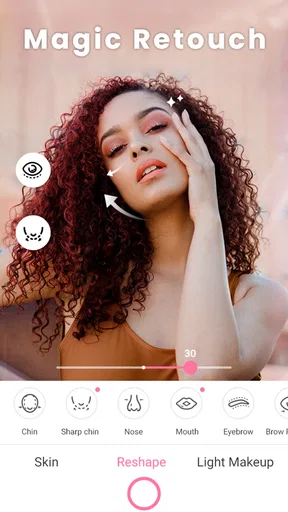
Now, let’s talk about the real game-changer: the real-time beauty effects. As you adjust the sliders, you can literally see your face morph into perfection right before your eyes. It’s like having a virtual makeup artist on standby. From smoothing out blemishes to brightening your eyes, every tweak is seamless.
Customization Galore
What I love about Beauty Camera - Sweet Camera is its level of customization. The range of options for altering your photos is vast. You can play around with:
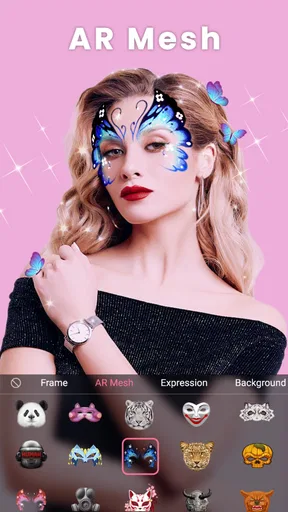
- AR Stickers that add a fun twist to your snaps.
- Makeup Effects for those days when you want to try a new look without the mess.
- Hair Color Changer – ever wondered how you'd look as a blonde or with a vibrant purple mane? Now you can know!
And don’t even get me started on the editing tools. From cropping to adjusting brightness and contrast, you’ve got everything you need to create a masterpiece. The app turns simple selfies into stunning portraits that look straight out of a fashion magazine.
Sharing is Caring
Once you've perfected your photo, sharing it with the world is a breeze. The app integrates smoothly with social media platforms, allowing you to post directly to Instagram, Facebook, or wherever your followers are waiting to admire your handiwork. The quality of the images remains top-notch, so no worries about pixelation spoiling your share-worthy moments.
It even allows you to create photo albums within the app, so you can organize your favorite shots and revisit them anytime. It’s like having a personal photo gallery in your pocket!
In the end, whether you’re a selfie enthusiast or just someone who wants to dabble in a bit of mobile photography, this app is a fantastic addition to your toolkit. It packs extensive features that cater to both beginners and seasoned photo-editors. So, next time you’re in the mood to capture your best angle, you know which app to turn to. Happy snapping!
Pros
- Easy-to-use interface for quick edits.
- Wide variety of filters and effects.
- Real-time beauty enhancement features.
- Allows photo and video editing.
- Lightweight app with fast performance.
Cons
- Contains ads that can be intrusive.
- Limited features in the free version.
- Some filters require in-app purchases.
- May over-process photos for some users.
- Occasional lag on older devices.
FAQs for Beauty Camera - Sweet Camera
What features does Beauty Camera - Sweet Camera offer?
Beauty Camera - Sweet Camera provides a range of features, including real-time beautification, filters, and effects that enhance your selfies and photos. It also offers tools for skin smoothing, teeth whitening, and makeup application. Users can enjoy a variety of editing options to create the perfect look.
Is Beauty Camera - Sweet Camera free to use?
Yes, Beauty Camera - Sweet Camera is free to download and use. However, it includes in-app purchases for additional filters, effects, and premium features. These purchases are optional, and the basic version offers a robust set of tools for most users.
Does Beauty Camera - Sweet Camera require an internet connection?
The app can be used offline for taking photos and applying basic edits. However, an internet connection is required for downloading additional filters and accessing certain features that are updated online. It also helps to have connectivity for sharing your photos directly to social media platforms.
How user-friendly is Beauty Camera - Sweet Camera for beginners?
Beauty Camera - Sweet Camera is designed with a user-friendly interface that is easy to navigate. Beginners will find it intuitive, with clear icons and straightforward options. Tutorials and guides are also available within the app to help new users learn how to make the most of its features.
Is my privacy protected when using Beauty Camera - Sweet Camera?
Beauty Camera - Sweet Camera takes user privacy seriously. The app requests necessary permissions for camera and storage access but ensures that your data is kept secure. Always review the app's privacy policy and settings to understand how your information is handled and ensure your preferences are met.


